Showing posts with label tos review crew. Show all posts

Wednesday, September 25, 2013

See It and Say It Flip Flop Learning Spanish Review


It has been several years since I took Spanish in High School.  Dora just doesn't cut it for an 8 year old.  Lydia has been wanting to learn a foreign language.  I have been hesitant because she does have some speech issues we are working to overcome.  I was assured by her doctor to go ahead and try.  I was worried about having a frustrated little girl.

We were given the opportunity to try out See It and Say It Flip Flop Learning Spanish (Ages 3 - adult) created by Senora Gose and published by Flip Flop Learning.  In the back of my mind I was still skeptical about introducing a foreign language to a child who has marked delays in reading due to her visual perception.  I mean if she isn't getting that, how is she going to handle picking up another language.
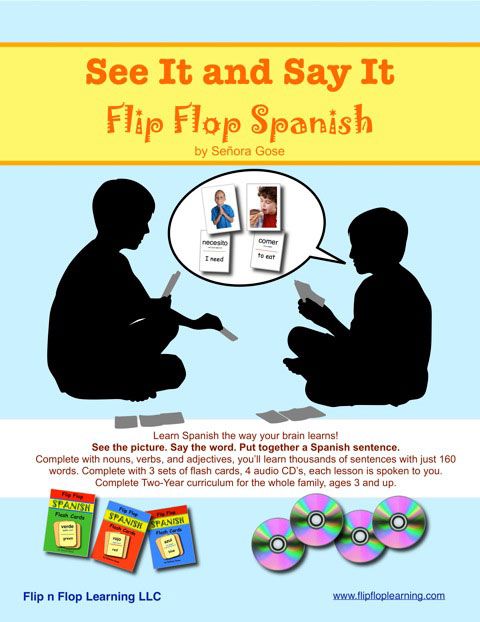

See It and Say It Flip Flop Spanish ($99.95) is a two year curriculum that teach ready to use Spanish.  In your first lesson you will learn to create your own sentences.   Included in See It and Say It Flip Flop Spanish are 4 audio cds (for use with each lesson),  a dry-erase paddle, lesson plans that are broken down into 45 weeks...including breaks, a white board paddle for visual learners, and 3 sets of colored flashcards.

The lesson plans are completely broken down.  Senora Gose has included recommendation about what to cover on certain days, how many days of the week to have Spanish and even has breaks built into the schedule.  It is so easy to plan this into our schedule.  I really spend a few minutes reading over that weeks lesson and gather the flashcards needed for that week.  I paperclip them to the lesson page and I am ready to go.  

We start our lesson by listening to our track and I flip the cards as they say the words.  


Next we play with the flashcards.  Lydia totally caught me off guard one lesson by copying the flashcards into her notebook.  She insisted matching the words up.  This was huge for her, since she has trouble copying from a book or board due to her visual delays.  She is actually more excited about learning another language.

The lessons in See It and Say It Flip Flop Spanish are short, and not only does planning take no extra time, but the lesson itself is as long as we want to make it.  Since she is working at improving a few speech sounds, I have not been pushing the foreign language with her.  But she is making improvement and loving it.

I really like the flashcards.  They are durable and bright colored.  Each include a nice picture on one side and the Spanish and English translation on the other.  With Lydia's reading delay, by seeing the picture first she does not seem to be feeling as frustrated about practicing her Spanish words.  She really liked creating her own sentences using these flashcards.  


See It and Say It Flip Flop Spanish is so much more than I expected.  It is not just learning words to use in Spanish, but it's learning how to speak conversational Spanish.  Included are grammar lessons along with the vocabulary.  See It and Say It Flip Flop Spanish  could easily be adapted for multi-level teaching.  Older students could be given harder writing assignments (depending on their ability levels) to help reinforce what they are learning.  Younger ones can still learn without writing too much, or actually any at all.

We have been moving a slight bit slower than is recommended by Senora Gose.  See It and Say It Flip Flop Spanish  can also be adapted for special need learners or even those who may be gifted.  You can simplify or increase the difficulty level of any of the lessons to adapt the program to your specific child's needs.

I have been extremely happy with See It and Say It Flip Flop Spanish and we will continue to use it.  I will also recommend this program to our friends and readers.  It is a little costly if you are on a budget, but it is very much worth it.  I am leaning toward purchasing the French program after Lydia has progressed through the Spanish program.  I will also be encouraging Joey to attempt Spanish again using See It and Say It Flip Flop Spanish .  

Several members of The Schoolhouse Review Crew were given the opportunity to review See It and Say It Flip Flop Spanish .  If you are not sure how this program will work for your family, please take some time to go through the the Schoolhouse Review Crew blog to see how they were able to use it in their homes.

Photobucket


Tuesday, September 24, 2013

The Presidential Game Review


Understanding our Presidential election process can be difficult for adults to understand at times, but even harder for kids.  I love getting the blank stares from Joey while trying learn about Elections.

The Presidential Game was developed to make learning about the Election process more fun for children.

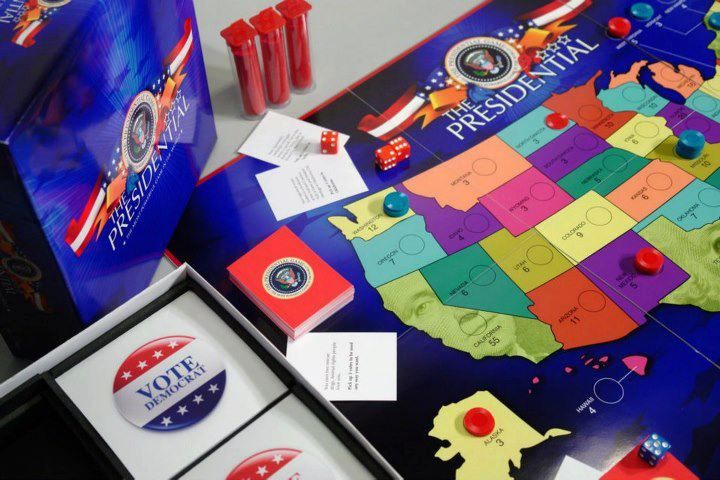
Created for kids Ages 11 and up, The Presidential Game ($35.00) was developed to really bring the process of understanding the importance of Electoral Votes to life for visual learners.  The object of the game is to campaign and win the Presidential election.  You must collect at least 270 electoral votes during the course of the game, the team that does wins.

Included in the game are 80 Political cards (which contain rewards and penalties for the teams), 40 write your own political cards, 150 Red Vote chips, 150 Blue Vote chips, 1 paper score pad and access to a Electoral WebMap "Calculator".

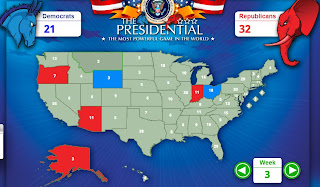
You have need 2 teams to be either the Republicans or Democrats.  You could have several people on each team to participate.  The WebMap Calculator can provide even more visual help for those who need to see the votes won.


During the last election, Joey tracked the Electoral votes the entire evening.  He understood that the Electoral votes were needed to win the election, not just the popular vote.

I was very excited to be given the opportunity to review The Presidential Game.  All of our kids do better learning visually whether it be through movies, games or just actual experience.  Since none of our kids will be running for President anytime soon, The Presidential Game would be the next best thing.

Our experience though playing, was not what I expected.  Joey and Brayden both meet the age recommendation, but they really struggled playing.  At first I thought it was because it was a new game.  They both got severely frustrated.  So we stepped back and put it away to try again.  I pulled it out again a few days later, and they still struggled trying to follow the steps.  Needless to say, my visual learners were still having trouble.

I absolutely love the concept of The Presidential Game.  The ability to show kids about campaigning, fundraising and even present them with various political situations that candidates face during campaigns, in a game format....is an educational gem.

So I have not given up by any means on playing this game with the boys.  Instead, we'll continue working with short game rounds.  I do see this game as adjustable for kids that have special needs and still be able to teach them the true objective of The Presidential Game.  We will continue to use The Presidential Game so that by next Election time, the kids will have a better grasp about campaigning and the election process.

Several members of the Schoolhouse Review Crew were given the opportunity to try out The Presidential Game.  Please take some time to see how this game worked with their families.

Photobucket


Sunday, April 7, 2013

Computer Science for Kids - Beginning Microsoft Small Basic Review

 photo ComputerScienceForKidsProgrammingTutorialsLogo_zps071e1e50.jpg

*****Disclaimer......I received Computer Science for Kids Beginning Microsoft Small Basic,  free of charge for the sole purpose of this review for the School House Review Crew. I was not required to write a positive review. The views I have expressed are my own and are real experiences with my family. I am disclosing this is accordance with the Federal Trade Commission's 16 CFR, Part 255 http://www.access.gpo.gov/nara/cfr/waisidx_03/16cfr255_03.html>:"Guides Concerning the Use of Endorsements and Testimonials in Advertising."****


I seriously know absolutely nothing about programming computers.  And this is one of Joey's biggest interests.  So I have begun to look at computer curriculum that maybe both of us could be able to use.  We were then given a wonderful opportunity by Computer Science for Kids to try out their Beginning Microsoft Small Basic e-book program (Reg. $59.95, on sale through 7/4/13 for $34.95).

 photo Beginning-Microsoft-Small-Basic-1937161196-By-Philip-Conrod-and-Lou-Tylee-Cover-Small_zpsb94fb127.jpg

Beginning Microsoft Small Basic has been written for students as young as 10 and can be used by adults also.  This program was super easy to download.  I then printed out the materials and put them in their own binder for Joey to keep on his desk for easy reference (and to encourage him to use it on his own).

This was definitely a daddy and son program to use together.  The lesson average time was (for Joe and Joey) about 30 minutes a couple times a week.  They usually do the lessons over dad's lunch hour if that gives you and idea how little extra time they take.  

Beginning Microsoft Small Basic consists of eleven chapters packed full of information ranging from program design, debugging, to graphics.  There are lessons on how to create fun games such as tic-tac-toe, a drawing program and even a Basic video game.

Beginning Microsoft Small Basic has over 500 pages of notes and actual course work.  I was very impressed with the amount of information packed into each chapter.  The first chapter even has some history thrown in to give the student an understanding of why and how Microsoft Small Basic was created.


Computer Software for Kids has actually partnered with Microsoft® DreamSpark® program to support and advance students learning and skills development, by providing middle and high school students the latest developer and design software from Microsoft, at no additional cost.

How has Joey been enjoying this program?  Well as much as he loves playing on the computer, he is having trouble grasping programming.  Between his Dad's help and the help of this program, a few things started clicking for him.  It has been a definite hands-on project between him and dad, as Joey was so far unable to work  completely independently on it.  

The programming that students will be working on is mixed right into the reading.  They are given the lines to type in through step-by-step instructions.  It gives them a great feeling of how to create.  I like that the instructions are mixed within the reading, making the reading more interesting and keep Joey's focus.  He does not handle computer "textbooks" well.  He cannot stay focused, but with the Beginning Microsoft Small Basic the pages could keep his focus better since what he was reading was his actual work.

Joe said everything is presented in a straight forward and easy-to-understand manner, and after a few more lessons he feels Joey will be able to work more independently than he already is.  Depending on how focused you make this as part of your studies, you could finish this program in a little over two months.  Or you could stretch this out over a couple semesters of computer programming lessons.  I know by the time that Joey gets to Chapters 10 and 11 he will get super excited at "creating" those unique programs.

I am definitely leaving this program as part of Joey's weekly schoolwork.  Who knows what he may start creating?  The price also makes it a very affordable option for families to use.

Other members of the SchoolHouse Review Crew were able to try out both Beginning Microsoft Small Basic and Computer Bible Programs for Microsoft Small Basic.  Stop over the SchoolHouse Review Crew Blog to see how these programs worked in their homes.


Photobucket

 photo Disclaimer2_zpsff718028.gif


Thursday, April 4, 2013

A Journey Through Learning Lapbook Review


Journey through Learning Logo photo journeythroughlearninglogo_zps21c38856.jpg

How many of you have tried lapbooking?  It's a great way to teach multi-levels in your home, classroom or co-op!  We recently had the opportunity to try out lapbooks from A Journey Through Learning...and we have fallen in love!!!

A Journey Through Learning was created by two homeschooling moms Nancy and Paula, who never intended on running a business.  But they wanted more quality hands-on learning products for homeschoolers.   A Journey Through Learning lapbooks were born.

We recently had the opportunity to try out several different lapbooks from A Journey Through Learning.  I must say this.....it was the easiest Science and History lessons I have done with the kids in a long time.  I had no extra planning.  I did order some books from the library and planned a couple extra activities, but to be honest we did not use any of the extra books for the kids.

Lydia used The Earth for Grades 1 - 4.


 photo theearthlaptop_zps8dd1e5cf.jpeg

It was super easy to use.  I downloaded the booklet and lapbook parts, and then followed the directions for connecting our file folders.

In The Earth ($13.00 for instant download), students learn about the Earth and what it is made of.  Topics covered include the crust, the spheres of the Earth, types of rocks, day/night and seasons, landforms, how mountains are formed, the water cycle, atmosphere, ocean zones, and volcanoes.  

Each topic has a 1-2 pages of information that you can read with the student or just allow them to ready on their own.  There is a lapbook piece to complete for each section also.  Like I mentioned earlier, I didn't need to add any extra.  There is even a list of suggested activities at the end of the book.  

Lydia enjoyed this book.  We covered 3-4 sections a week, and it took us about 3 weeks to finish.  We could've stretched it out further and went a lot deeper, which is how you can use this for multi-level teaching.  Since Lydia is technically in 1st grade, we used just the information provided to us.  The only extra I provided for Lydia was some hands-on activities such as these....

We used a flashlight with our globe to learn about seasons and day/night.

We used a hard boiled egg to show the layers of the Earth.
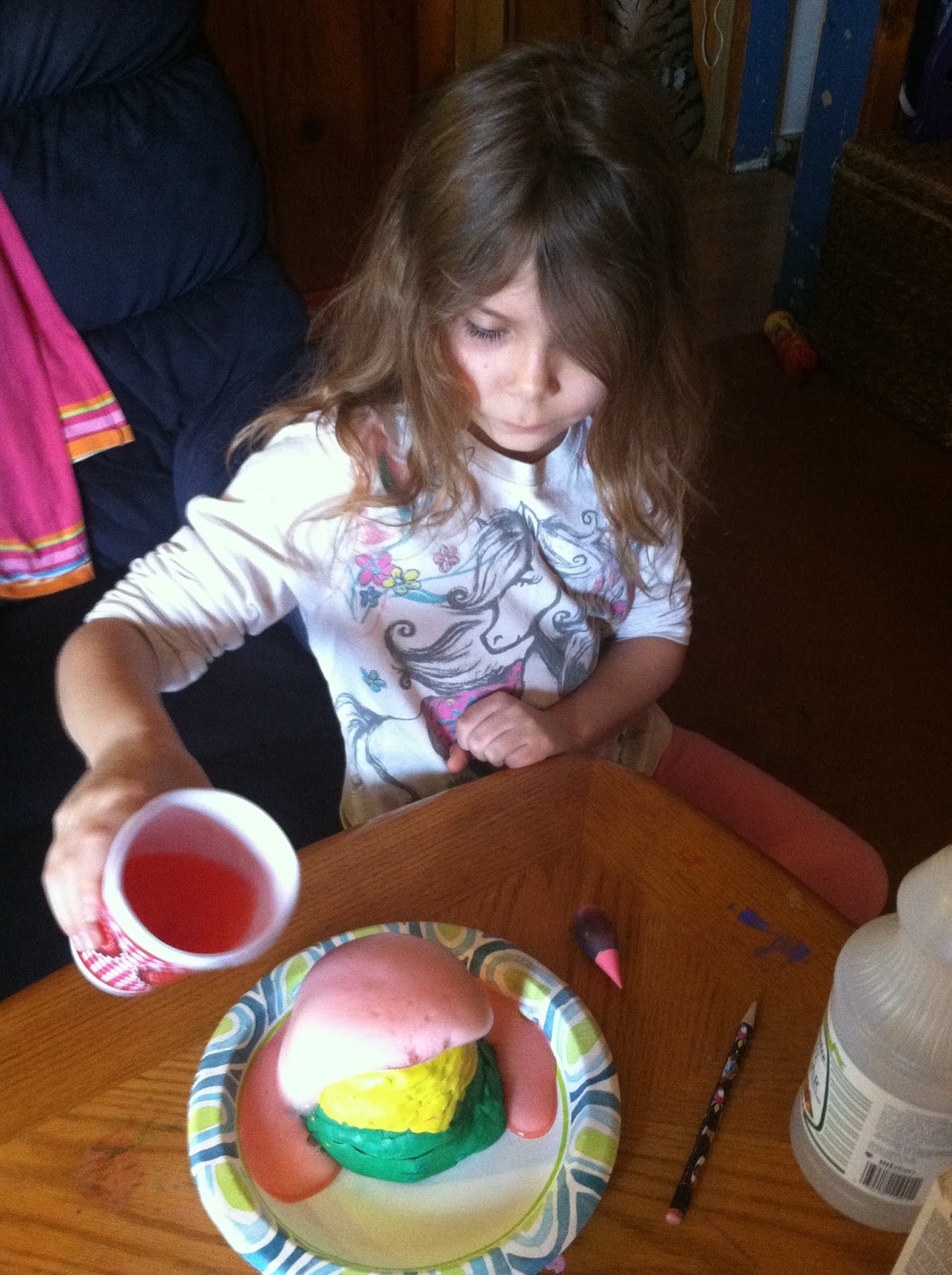
She made a volcano with modeling clay.
All the parts fit neatly in the folder.  There is even a diagram so that you can place the parts in so they fit better.  (I thought this was great, because I always have trouble with this.)  When we finished, our booklet of information fit inside neatly and I was able to store it on the shelf.


We also have the opportunity to try out these studies:

Joey did Knights and Castles ($13.00 for instant download) on his own.  Again, I over reserved material from the library only to discover that all the information is provided.  It was the perfect amount of information for Joey to understand.  There are activities suggested were wonderful and the only extras I threw in were some recipes and I found some costumes and dress-up kits from our local art museum.  How simple! 

Some of the topics covered are:  fall of Rome, leads into the Middle Ages and then the real fun begins when learning all about knights, castles, heraldry, serfs, and peasants.

He was able to finish the majority of this with minimal help from me.  He would do the reading and I would help him assemble the lapbook.  I did that mainly to verify that he had completed his reading.  He finished this one in a little over two weeks, and he really enjoyed the content and what he read.  He learned alot.  I supplemented with a couple fun movies like A Knight's Tale and Black Knight, and he even cooked some medieval type meals.

Knights and Castles photo knightsandcastles_zps3e1f0ab1.jpeg
Here he made original Gingerbread using "stale" bread, honey and ginger.  Just like they would have in medieval times.'
Making a coat of arms.
 Wearing a costume from the art museum box.
I checked out a box on Knights and Castles from our Art Museum library, thinking how great to have all the supplements.  Funny thing is, the kids loved the costumes and all the "extras" I thought would enhance our study was actually in the material already provided by A Journey through Learning.  I say this again, to show how simple and easy these unit studies are for families.

Caty had the opportunity to use (and we are still using this in her studies) Letters, Numbers and Shapes ($13.00).  She is having fun with this and we are currently using this alongside her Hooked on Phonics alphabet study and we used the shapes and numbers section to have Shape/Number days.  


Letters, Numbers and Shapes photo Lettersnumbersandshapes_zps1d7d968f.jpeg

Caty really has enjoyed working on this lapbook.  She has even asked to go back and look at what she completes.  That is something the boys have never asked to do with a lapbook.  
 She enjoys the hands on and "creating".  

Some of the topics covered in Letters, Numbers and Shapes include:  basic number skills, counting, shapes, and letter activities.  This is very basic early learning skills made with a fun approach.  It has worked well to enhance her other curriculum and make those basic skills more fun.  This lapbook would be great so the littles who want to do lapbooks with their older siblings can have one at their level.

The final book that we have the privilege to review, was Astronomy and Space Unit Study ($13.00 for instant download).  I approached this study a little differently.  Both boys worked on this unit study.  Instead of a "lapbook" approach, I chose to bind this unit together and do it like a notebook.  

Astronomy and Space photo astronomylapbook_zps68bf09d3.jpeg
I put a divider sheet between each unit, to make is simplier for the boys to find their "spots" and assignments.  


Again, it was simple to print and we were up and running in no time.  I did order supplemental material, but we used maybe one book.  They were able to do this unit study on their own, and I supplemented with videos from Brain Pop and Brain Pop Jr, as well as Magic School Bus.  Kids on the higher grade level might find those a little "babyish", but they worked out well for our boys.

Some topics included in this study are comets, asteroids, planets, moon phases, astronauts, stars, etc.  Here is the boys learning about moon phases.  They each made a chart.


We also added a model of the solar system....

So how well did these work for us.....A Journey Through Learning lapbooks were a huge hit with all the kids.  I loved the simplicity.  My only real prep work was a little reading of the material, printing the booklets, and writing a suggested time schedule for each kid.  Science went very smoothly for the month of March!!!  Lydia felt a sense of accomplishment and loved seeing her little "book" that she helped create about the Earth.  Caty is also enjoying her "book" and she looks at it even on days we are not adding to it.

We are already looking at the next topics the kids would like to cover.  I would highly recommend A Journey Through Learning products for any family.  

Several members from the SchoolHouse Review Crew had the privilege of using A Journey Through Learning products in their homes.  Be sure to check out The SchoolHouse Review Crew Blog to read about their experiences.


Photobucket

 photo DisclaimerGraphic1_zpsf612f371.gif